기존 포스팅에 앞서 트위터의 로그인 페이지에서 부족했던 부분들을 수정하고 전체적으로 정리하였다.
2025.12.13 - [Front-End/HTML] - HTML - 트위터 클론 코딩 - 1
| 1. a태그 추가 target="_blank"로 새창 띄우도록 2. Footer 내용 동적 렌더링 3. CSS 모듈화(버튼) 4. 버튼 및 로그인 안내문 등 문서 전체 컴포넌트화 |
HTML
<!DOCTYPE html>
<html lang="ko">

<head>
    <meta charset="UTF-8">
    <meta name="viewport" content="width=device-width, initial-scale=1.0">
    <title>X. It's what's happening / X</title>
    <link rel="stylesheet" href="./twiterclone.css">
</head>

<body>
    <div class="maincontainer">
        <div class="section1">
            <!--mainLogo.js-->
        </div>
        <div class="section2">
            <div class="mainFont">
                <!--로그인 안내문-->
            </div>
            <div class="btncontainer">
                <!--button.js와 구분선 등등..-->
            </div>
        </div>
    </div>

    <div id="footer" class="footer">
        <!--footerItems.js-->
    </div>

    <script type="module" src="./JS/login/index.js"></script>
</body>

</html>
저번 포스팅보다 훨씬 간결하고 눈에띄게 깔끔해졌다.
JavaScript
최대한 컴포넌트화와 동적 렌더링을 통해 정리하였고, 이는 아래의 파일들로 존재한다.
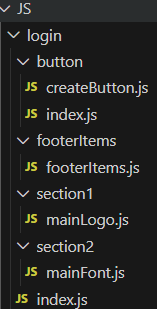
JS 폴더 - Login 폴더
button 폴더
createButton.js
export function createButton(config) {
  const { id, className, text, svgPath, imgSrc} = config;
  if (imgSrc) {
    return `
        <button id="${id}" class="${className}">
            <img src="${imgSrc}" alt="${text}">
            ${text}
        </button>
        `;
  }
  else if(svgPath){
    return `
        <button id="${id}" class="${className}">
            <svg viewBox="0 0 24 24" aria-hidden="true"
                class="r-4qtqp9 r-yyyyoo r-dnmrzs r-bnwqim r-lrvibr r-m6rgpd r-18jsvk2 r-rxcuwo r-1777fci r-m327ed r-494qqr">
                <g>
                    <path d="${svgPath}"></path>
                </g>
            </svg>
            ${text}
        </button>
    `;
  }
  return `
        <button id="${id}" class="${className}">
            ${text}
        </button>
    `;
}index.js
import {createButton} from './createButton.js'

export function buttons(){
    const items = [
        {
            type: 'button',
            id: 'google_btn',
            className: 'btn-api',
            text: 'Sign up with Google',
            imgSrc: 'https://developers.google.com/identity/images/g-logo.png'
        },
        {
            type: 'button',
            id: 'apple_btn',
            className: 'btn-api',
            text: 'Sign up with Apple',
            imgSrc: 'https://upload.wikimedia.org/wikipedia/commons/f/fa/Apple_logo_black.svg'
        },
        {
            type: 'divider',
        },
        {
            type: 'button',
            id: 'create_btn',
            className: 'btn-signin',
            text: 'Create account'
        },
        {
            className: 'policyfont'
        },
        {
            className: 'alreadyfont'
        },
        {
            type: 'button',
            id: 'signin_btn',
            className: 'btn-api',
            text: 'Sign in'
        },
        {
            type: 'button',
            id: 'getTheApp_btn',
            className: 'btn-api',
            text: 'Get the app',
            svgPath: 'M21.742 21.75l-7.563-11.179 7.056-8.321h-2.456l-5.691 6.714-4.54-6.714H2.359l7.29 10.776L2.25 21.75h2.456l6.035-7.118 4.818 7.118h6.191-.008zM7.739 3.818L18.81 20.182h-2.447L5.29 3.818h2.447z'
        }

    ];

    const container = document.querySelector('.btncontainer');

    items.forEach(item =>{
        if(item.type === 'divider'){
            container.innerHTML += `
                <div class="or-divider">
                    <hr class="line">
                    <span>OR</span>
                    <hr class="line">
                </div>
            `;
        }
        else if(item.type === 'button'){
            container.innerHTML += createButton(item);
        }
        else if(item.className === 'policyfont'){
            container.innerHTML += `
                <p class="policyfont">By signing up, you agree to the <a href="https://x.com/en/tos" target="_blank">Terms of Service</a> and <a href="https://x.com/en/privacy" target="_blank">Privacy Policy</a>, including
                <a href="https://help.x.com/en/rules-and-policies/x-cookies" target="_blank">Cookie Use.</a></p>
        `;
        }
        else if(item.className === 'alreadyfont'){
            container.innerHTML += `
                <p class="alreadyfont">Already have an account?</p>
            `
        }
    });
}
footerItems.js
/** footer 내용 */
export function footerDiv() {
  const footerItems = [
    {text:"About", href:"https://about.x.com/en"},
    {text:"Download the X app", href:"https://help.x.com/en/using-x/download-the-x-app" },
    {text:"Grok", href:"https://apps.apple.com/us/app/grok/id6670324846"},
    {text:"Help Center", href:"https://help.x.com/en"},
    {text:"Terms of Service", href:"https://x.com/en/tos"},
    {text:"Privacy Policy", href:"https://x.com/en/privacy"},
    {text:"Cookie Policy", href:"https://help.x.com/en/rules-and-policies/x-cookies"},
    {text:"Accessibility", href:"https://help.x.com/en/resources/accessibility"},
    {text:"Ads info", href:"https://business.x.com/en/help/troubleshooting/how-x-ads-work"},
    {text:"Blog", href:"https://blog.x.com/"},
    {text:"Careers", href:"https://x.ai/careers"},
    {text:"Brand Resources", href:"https://about.x.com/en/who-we-are/brand-toolkit"},
    {text:"Advertising", href:"https://business.x.com/en/advertising?ref=gl-tw-tw-twitter-advertise"},
    {text:"Marketing", href:"https://business.x.com/en"},
    {text:"X for Business", href:"https://business.x.com/en?ref=web-twc-ao-gbl-twitterforbusiness&utm_source=twc&utm_medium=web&utm_campaign=ao&utm_content=twitterforbusiness"},
    {text:"Developers", href:"https://business.x.com/en?ref=web-twc-ao-gbl-twitterforbusiness&utm_source=twc&utm_medium=web&utm_campaign=ao&utm_content=twitterforbusiness"},
    {text:"News", href:"https://x.com/i/jf/stories/home"},
    {text:"Settings", href:"https://x.com/settings"},
    {text:"© 2025 X Corp."}
  ];

  const footer = document.getElementById("footer");
  footer.innerHTML = footerItems
    .map((item, index) =>
      index === footerItems.length - 1
        ? `<div>${item.text}</div>`
        : `<div><a href="${item.href}" target="_blank">${item.text}</a></div><span class="footerline">|</span>`
    )
    .join("");
}
section 1 폴더
mainLogo.js
export function logoSvg(){
    const container = document.querySelector('.section1');

    const logoItem = `
            <div class="svgclass">
                <svg viewBox="0 0 24 24" aria-hidden="true"
                    class="r-4qtqp9 r-yyyyoo r-dnmrzs r-bnwqim r-lrvibr r-m6rgpd r-18jsvk2 r-rxcuwo r-1777fci r-m327ed r-494qqr">
                    <g>
                        <path
                            d="M21.742 21.75l-7.563-11.179 7.056-8.321h-2.456l-5.691 6.714-4.54-6.714H2.359l7.29 10.776L2.25 21.75h2.456l6.035-7.118 4.818 7.118h6.191-.008zM7.739 3.818L18.81 20.182h-2.447L5.29 3.818h2.447z">
                        </path>
                    </g>
                </svg>
            </div>
    `
    container.innerHTML += logoItem;
}section 2 폴더
mainFont.js
export function mainFont(){

    const item = [
        {
            className: 'h1c',
            text1: 'Happening',
            text2: 'now',
            text3: 'Join today.'
        }
    ]

    const container = document.querySelector('.mainFont');

    item.forEach(item => {
        container.innerHTML += `
            <div class="${item.className}">
                <h1>${item.text1}</h1>
                <h1>${item.text2}</h1>
            </div>
            <p>${item.text3}</p>
        `
    })
}
index.js
import {mainFont} from "./section2/mainFont.js";
import {logoSvg} from "./section1/mainLogo.js";
import {footerDiv} from "./footerItems/footerItems.js";
import {buttons} from "./button/index.js";

mainFont();
logoSvg();
footerDiv();
buttons();
CSS
twiterclone.css
@import url(./CSS/button/buttonLayout.css);

@font-face {
    font-family: 'Chirp Heavy';
    src: url("./Chirp\ Bold.ttf");
}

h1 {
    margin: 0;
    padding: 0;
}

html, body{
    margin: 0;
    padding: 0;
    overflow: hidden;
}

/*태블릿*/
@media (max-width: 1024px) {
    html, body{
        overflow-y: scroll;
    }
    .svgclass {
        width: 50px;
    }

    .maincontainer {
        padding-left: 60px;
        margin-top: 40px;
        margin-bottom: 70px;
    }

    .h1c {
        display: inline;
    }

    .mainFont {
        margin-top: 50px;
    }
}

/*데스크탑*/
@media (min-width:1025px) {
    .section1 {
        /*로고 중앙정렬*/
        display: flex;
        align-items: center;
        justify-content: center;
        width: 45%;
        height: auto;
    }

    /*버튼UI/UX*/
    .section2{
        padding-left: 100px;
        width: 45%;
        height: auto;
    }

    .svgclass {
        width: 20vw;
    }

    .maincontainer {
        margin: 0;
        padding: 0;
        display: flex;
        justify-content: center;
        align-items: center;
        height: 92vh;
        width: 100vw;
    }

    .mainFont {
        padding-left: 20px;
    }

    .h1c {
        display: flex;
        gap: 10px;
    }
}


.alreadyfont{
    font-family: 'Chirp Heavy';
}
.policyfont{
    font-size: 10px;
    margin-top: 15px;
}

.mainFont {
    font-family: 'Chirp Heavy';
    font-size: 30px;
    color: rgb(15, 20, 25);
}

p {
    margin-top: 40px;
    padding: 0;
}

.footer{
    justify-content: center;
    display: flex;
    flex-wrap: wrap;
    gap: 10px;
    margin-bottom: 10px;
    padding: 0;
    font-size: 11px;
    white-space: nowrap;
    color: #5c5c5c;
}
.footer a{
    color: #5c5c5c;
    text-decoration-line: none;
}
.footer a:hover{
    text-decoration-line: underline;
}

.footerline{
    font-family:'Lucida Sans', 'Lucida Sans Regular', 'Lucida Grande', 'Lucida Sans Unicode', Geneva, Verdana, sans-serif;
}

/* Create account 버튼 아래 구문 */
.policyfont a{
    text-decoration-line: none;
    color: rgb(110, 110, 255);
}
.policyfont a:hover{
    text-decoration: underline;
}
/* 구글 버튼 */
#google_btn:hover{
    background-color: rgba(200, 225, 255, 0.5);
    transition-duration: 0.5s;
}

/* 애플 버튼 */
#apple_btn:hover{
    background-color: rgba(170, 170, 170, 0.5);
    transition-duration: 0.5s;
}

/* 계정 만들기 버튼 */
#create_btn:hover{
    background-color: rgb(45, 50, 55);
    transition-duration: 0.5s;
}

/* Sign in, Get the app 버튼 */
#signin_btn:hover, #getTheApp_btn:hover{
    background-color: rgba(170, 170, 170, 0.5);
    transition-duration: 0.5s;
}
buttonLayout.css
@import url(./buttonAction.css);

/* 버튼 */
.btncontainer {
    width: 300px;
    display: flex;
    flex-direction: column;
}
.or-divider{
    display: flex;
    align-items: center;
    gap: 10px;
    margin: 10px 0;
}
.or-divider .line{
    flex: 1;
    border: none;
    border-top: 1px solid #ebebeb;
}
.btn-api {
    display: flex;
    align-items: center;
    justify-content: center;
    gap: 8px;
    background-color: white;
    border: 1px solid #ccc;
    padding: 8px 16px;
    border-radius: 20px;
    cursor: pointer;
    font-weight: 500;
    width: 300px;
    height: 40px;
    margin-top: 15px;
}

.btn-api img {
    height: 20px;
}

.btn-signin {
    font-family: 'Chirp Heavy';
    font-size: 15px;
    color: white;
    background-color: rgb(15, 20, 25);
    border-radius: 20px;
    padding: 8px 16px;
    width: 300px;
    height: 40px;
    border: 1px solid white;
    cursor: pointer;
}
.btn-api svg{
    width: 20px;
}
기능
1. footer에 a태그를 추가하여 트위터 홈페이지처럼 사이트를 이동할 수 있도록만들었다.
다만, 실제로 twiter(X)의 모든 페이지를 다 구현하기엔 시간상 어려움이 있어서 주소는 실제 사이트로 연결시켰다.
2. footer, button 등 같은 내용이 많이 반복되고, html상에 구현하게 되었을때 내용이 너무 많아지는 문제가 있었다.
바닐라 자바스크립트를 통해 DOM API를 이용해 HTML을 생성, 이는 동적 렌더링중에 클라이언트 사이드 렌더링(CSR)을 사용하였다.
동적 렌더링의 종류 : SSR(서버 사이드 렌더링), CSR(클라이언트 사이드 렌더링), Hydration(SSR + CSR), SSG(정적 사이트 생성) 등
3. 문서 컴포넌트화
각 기능별로 나누어 문서를 분류하였다.
주의할점
주석 처리 : 좀 더 주석을 통해서 내가 구현한 내용들을 다른 사람 또는 나중에 내가 다시 볼때 이해하기 쉽도록 할 필요가 있어보임
클래스와 ID 변수명 : 지금 사용하고 있는 클래스와 ID 변수명이 너무 직관적이지 않음, 네이밍에 조금더 신경쓸 수 있도록 해야함
불분명한 컴포넌트화 : 기능별로 나누긴 했지만, 현재의 기능별 구분이 명확해 보이지가 않음
컨벤션 : 각 코드별로 컨벤션을 최대한 맞추어 코드가 모두 동일한 기준과 모양을 갖도록 신경쓸 필요가 있어보임
'Front-End > HTML' 카테고리의 다른 글
| HTML 분류화 및 접근성 + 시멘틱 구조(검색엔진 최적화) + 유지보수성 개선 (0) | 2026.01.21 |
|---|---|
| HTML - 트위터 클론 코딩 - 1 (1) | 2025.12.13 |
| HTML/CSS - a 태그를 이용하여 자동 스크롤 / 부드러운 스크롤 (0) | 2025.12.12 |
| HTML/CSS - 비디오 메인화면 제작하기 (2) | 2025.12.12 |
| HTML/CSS - <header> (0) | 2025.11.25 |